If you’ve spent any time exploring AI art tools, you’ve probably come across Mage Space. It’s one of the more talked-about platforms in the AI image and video generation space, mostly because it lets people create without constantly hitting a wall of credit limits.
What makes Mage Space stand out isn’t just the unlimited generation angle — it’s the sheer range of models packed into one browser tab. Stable Diffusion, Flux, Qwen, Krea, and a long list of Mage’s own fine-tuned models all live under one roof, alongside tools for video, character creation, and image editing.
This guide walks through what Mage Space actually is, how it works, what it costs, and whether it’s worth your time — whether you’re a curious beginner or someone evaluating it for professional use.
What Is Mage Space?
Mage Space is a browser-based AI content generation platform that turns text prompts (and reference images) into images and videos. It runs on a mix of open-source models — like Stable Diffusion and Flux — and a set of proprietary, fine-tuned models built by the Mage team, often named after fruits (Mango, Guava, Peach, Cherry, and so on).
At its core, Mage Space is built around three ideas:
- Accessibility — no complicated setup, no local GPU needed, everything runs in the browser.
- Creative freedom — fewer content restrictions than many mainstream AI art tools, within stated legal limits.
- Model variety — instead of locking you into one AI engine, it gives you a whole library to pick from.
It’s used for everything from fantasy art and illustration to AI-generated characters, short videos, and image editing tasks like face swaps, outfit changes, and upscaling.
How Does Mage Space Work?
At a basic level, using Mage Space follows a familiar pattern for anyone who’s tried an AI image generator before:
- You type a text prompt describing what you want to create.
- You pick a model (or let the default one handle it).
- The platform generates one or more images or a video clip based on your prompt.
- You can refine, upscale, edit, or animate the result using built-in tools.
What’s a little different is how usage is metered. Mage Space uses a currency called Gems. Free users get a one-time bonus of Gems to try things out, and Gems can also be earned or purchased to run any model on demand. Paid memberships, on the other hand, unlock unlimited generations on top of monthly Gem allowances — so heavy users typically move to a subscription rather than buying Gems repeatedly.
Beyond basic prompt-to-image generation, Mage Space also supports consistent AI characters (upload a reference photo once, reuse the same character across many generations), ControlNet-guided generation, inpainting for editing specific areas of an image, and a full suite of one-click “apps” for tasks like face swap, relighting, and video editing.
Key Features of Mage Space
Wide model library Mage Space gives you access to a large collection of models in one interface — including Stable Diffusion 1.5/XL/3.5, Flux and Flux 2, Krea 2, Z-Image, Qwen, and Mage’s own exclusive fine-tunes. This matters because different models are better suited to different art styles, from photorealism to anime to illustration.
AI video generation On paid plans, Mage Space supports text-to-video and image-to-video generation, along with an “Animate” feature that brings still images to life. Video resolution and duration scale up as you move to higher-tier plans.
Consistent AI characters Upload one reference image, and Mage Space can keep that character consistent across many different images and videos — useful for storytelling, fantasy art series, or building a recurring AI persona.
Motion Control A more advanced feature (available on the top-tier plan) that lets you upload a reference video and apply its movement to your AI-generated character, so it can dance, walk, or act out a scene naturally.
Editing and enhancement tools Mage Space includes a set of standalone apps: an image enhancer/upscaler, video enhancer, inpainting tool, face swap, outfit swap, background relighting, skin enhancer, and a lipsync tool for making a character “speak” an audio clip.
LoRA and ControlNet support For users who want finer control over style and composition, Mage Space supports LoRAs, Textual Inversion, and ControlNet — features usually found in more technical, self-hosted Stable Diffusion setups.
Custom model import Higher-tier plans allow importing your own custom models (SD1.5, SDXL, Pony, Illustrious, and more), which is useful for creators who’ve trained or downloaded specialized models elsewhere.
Privacy by default Generations on Mage Space are private unless you choose to post them publicly to the community feed, which is a notable difference from tools that default to public galleries.
How to Use Mage Space
Getting started with Mage Space is straightforward, even if you’ve never used an AI generator before.
- Go to the Mage Space website and create a free account (or sign in with an existing login option).
- Choose a model from the model library based on the style you’re going for — realistic, anime, fantasy, and so on.
- Write a prompt. Describe your subject, style, lighting, and mood in plain language. The more specific you are, the closer the output matches your vision.
- Generate your image or video. Free accounts use their Gem bonus for this; paid members generate without worrying about running out.
- Refine the result. Use inpainting to fix small areas, the enhancer to upscale resolution, or ControlNet to guide the composition more precisely.
- Turn it into a video (optional). If you’re on a paid plan, use the Animate or text/image-to-video tools to bring a still image to life.
- Save or share. Download your creation, or post it to the Mage community feed if you want feedback or exposure.
For best results, it helps to experiment with different models for the same prompt — a fantasy portrait might look completely different rendered in Flux versus one of Mage’s exclusive fine-tunes.
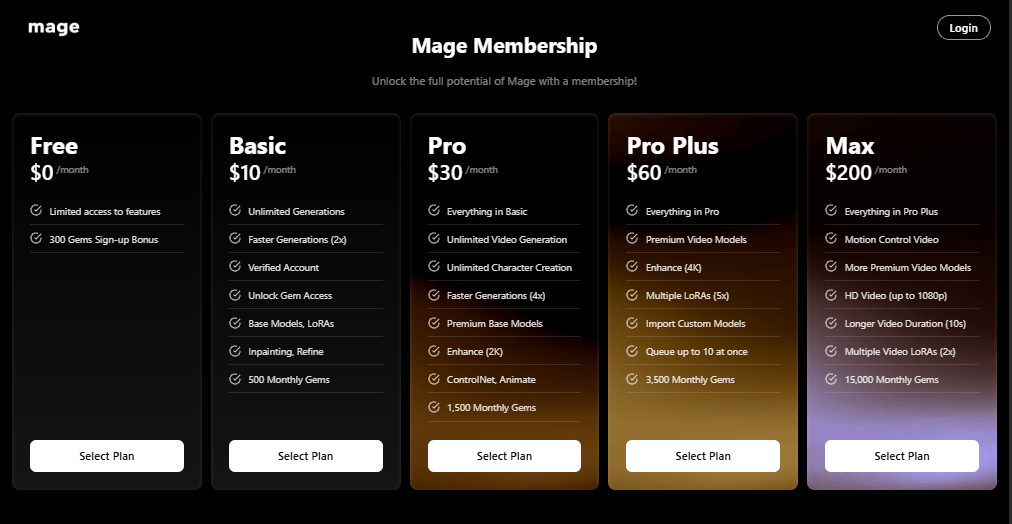
Mage Space Pricing and Plans
Mage Space uses a freemium model with several paid tiers. Note that AI tool pricing changes fairly often, so it’s worth double-checking the current rates on the official Mage Space website before subscribing.
| Plan | Price | What You Get |
|---|---|---|
| Free | $0/month | Limited access, one-time 300 Gem sign-up bonus |
| Basic | $10/month | Unlimited generations, 2x speed, base models, LoRA, inpainting, 500 monthly Gems |
| Pro | $30/month | Everything in Basic, unlimited video generation, unlimited character creation, 4x speed, ControlNet, 1,500 monthly Gems |
| Pro Plus | $60/month | Everything in Pro, premium video models, 4K enhance, up to 5 LoRAs, custom model import, 3,500 monthly Gems |
| Max | $200/month | Everything in Pro Plus, Motion Control video, HD video up to 2K, longer video duration, 15,000 monthly Gems |
A few things worth knowing about the pricing structure:
- The free plan is a good way to test the interface and a handful of models, but it’s no longer built for unlimited casual use — that requires at least the Basic plan.
- Unlimited generation doesn’t mean unlimited access to every model or tool; higher tiers unlock better models, faster speeds, and more advanced features like video and custom model imports.
- Content created on any plan, including free, comes with a commercial usage license, so you can use your generations commercially without needing to upgrade specifically for that reason.
Pros and Cons
| Pros | Cons |
|---|---|
| Access to a huge library of models in one place | Free tier is limited to a one-time Gem bonus, not ongoing free use |
| Unlimited generations available from a relatively affordable Basic plan | Video generation and advanced tools are locked behind higher-priced tiers |
| Strong customization: LoRA, ControlNet, custom model imports | Pricing can climb quickly if you want premium video and 4K enhancement |
| Private-by-default generations | Some users report slower customer support response times |
| Fewer content restrictions than many mainstream tools | Fewer restrictions means the platform isn’t ideal for all audiences or workplaces |
| Useful bundled apps (face swap, lipsync, relight, upscaling) | The Gem system can feel confusing to first-time users |
Who Should Use Mage Space?
Mage Space tends to work best for:
- Digital artists and illustrators who want to experiment across multiple AI models without switching platforms.
- Content creators and marketers who need quick, private AI visuals for social posts, thumbnails, or concept art.
- Hobbyists and worldbuilders who want consistent AI characters across a series of images or a story.
- Creators exploring AI video who want image-to-video and animation tools without a steep technical learning curve.
- Power users familiar with Stable Diffusion who want LoRA, ControlNet, and custom model support without running local hardware.
It’s less suited to users who want a completely free, unlimited tool with no subscription, or teams that need a tightly moderated, enterprise-style content environment.
Best Alternatives to Mage Space
Midjourney Known for its distinctive, painterly aesthetic and strong community. It’s subscription-only (no meaningful free tier) and works primarily through Discord or its web app, with tighter content moderation than Mage Space.
Adobe Firefly A strong pick for users already inside the Adobe ecosystem — it integrates directly with Photoshop and Illustrator and is trained with commercial licensing in mind, which appeals to professional and enterprise users.
Leonardo AI Offers a generous free tier, strong fine-tuning options, and a clean interface aimed at game artists and designers who need consistent character and asset generation.
NightCafe A community-driven AI art platform with a daily-credit free system, popular for its social features, contests, and accessible pricing for casual creators.
DreamStudio (Stability AI) The official interface for Stable Diffusion models, priced on a pay-as-you-go credit basis. It’s a good option for users who want a straightforward, no-subscription relationship with Stable Diffusion specifically.
Is Mage Space Safe to Use?
Mage Space is a legitimate, actively maintained platform with standard account security, a published privacy policy, and a stated commercial-use license for generated content. Generations are private by default, which is a meaningful privacy plus compared to platforms that default to public galleries.
That said, a few points are worth keeping in mind:
- Mage Space allows more creative freedom than many competitors, including mature content within its terms of service — so it may not be the right fit for workplace, educational, or family-shared use.
- As with any AI platform, you should avoid uploading sensitive personal images (especially of other people) without consent, since reference images can be used to generate new content.
- Read the terms of service and privacy policy directly on the official site before subscribing, since content and data-handling policies can be updated over time.
Overall, there’s nothing that flags Mage Space as unsafe in a technical sense — it’s a normal SaaS platform with account-based access and payment processing like any other subscription tool.
Frequently Asked Questions (FAQs)
Is Mage Space really free? There’s a free tier, but it’s limited to a one-time bonus of Gems rather than ongoing unlimited use. For regular, unlimited generation, you’ll need at least the Basic paid plan.
Do I need design or AI experience to use Mage Space? No. The interface is prompt-based and beginner-friendly. That said, advanced features like ControlNet and custom model imports will make more sense if you already have some AI image generation background.
Can I use Mage Space images and videos commercially? Yes. Content created on Mage Space, including on the free tier, comes with a commercial usage license, though attribution is appreciated but not required.
Does Mage Space support AI video generation? Yes, starting from the Pro plan ($30/month), which includes unlimited video and character generation. Higher tiers add better resolution, longer duration, and Motion Control.
What’s the difference between Gems and a membership? Gems are a pay-per-use currency that lets anyone run models without subscribing. Memberships add unlimited generations, faster processing, and exclusive features on top of a monthly Gem allowance.
Is my content private on Mage Space? Yes, generations are private by default. You can choose to publicly post specific creations to the community feed if you want.
How does Mage Space compare to Midjourney? Midjourney has no real free tier and leans toward a distinct artistic style with tighter moderation. Mage Space offers more model variety, more creative freedom, and an unlimited-generation option starting at a lower monthly price.
Final Verdict
Mage Space earns its reputation mainly through sheer flexibility — a wide model library, solid video tools, character consistency, and a genuinely useful set of editing apps, all in one browser-based platform. The pricing has become more structured over time, so the free tier isn’t the unlimited playground it once was, but the Basic plan at $10/month remains a reasonable entry point for unlimited image generation.
If you want one AI platform that covers image generation, video, editing, and character creation without juggling multiple subscriptions, Mage Space is worth trying. If you specifically need a completely free tool or a tightly moderated environment for professional/enterprise use, it’s worth comparing against alternatives like Leonardo AI or Adobe Firefly before committing.
As always, pricing and features can change — check the official Mage Space website for the latest plans before subscribing.