If you’ve ever spent ten minutes hunting through folders for a note you know you wrote, you already understand the problem Mem AI is trying to solve. Most note-taking apps ask you to do the organizing yourself — tags, folders, nested pages, endless little decisions about where something “belongs.” Mem AI flips that around. You write. The AI organizes.
That pitch has made Mem one of the more talked-about tools in the AI productivity space. But does it actually hold up once you’re using it every day? This guide walks through what Mem AI is, how it works, what it costs, and who it’s actually good for.
What Is Mem AI?
Mem AI is an AI-powered note-taking app built around a simple idea: your notes should organize themselves. Instead of manually sorting information into folders and tags, you just write, and the app’s AI figures out how everything connects.
Under the hood, Mem uses natural language processing to read your notes, spot relationships between them, and automatically link related ideas. The result is often described as a “second brain” — a growing, self-organizing knowledge base built from everything you capture, whether that’s a quick thought, a meeting summary, or a research note.
Mem 2.0, released in early 2026, brought a noticeably faster and more stable experience than the original version, along with a smarter AI assistant built directly into the writing surface.
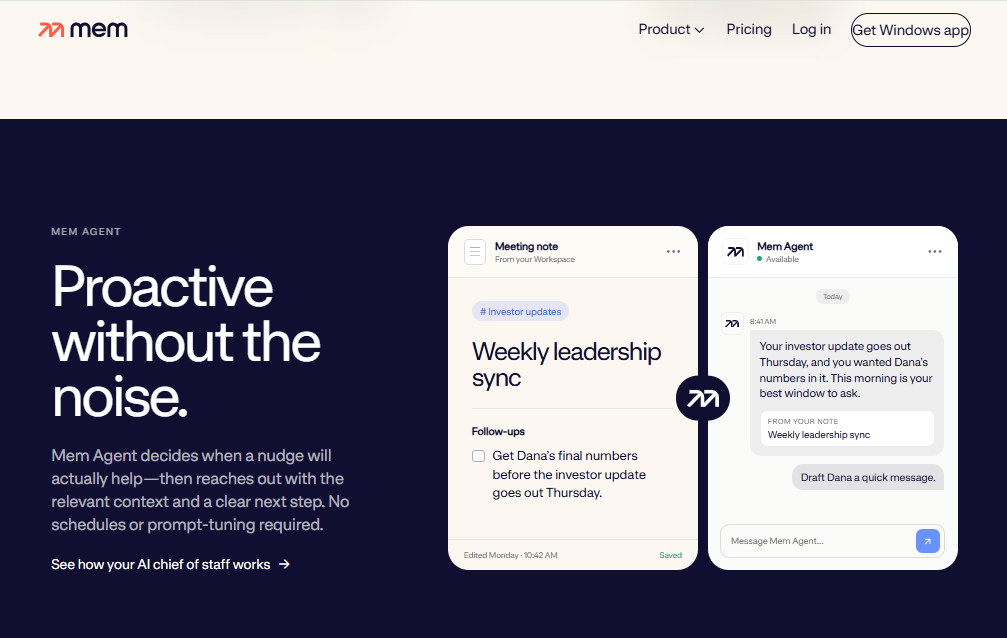
Key Features of Mem AI
Mem’s feature set is built around one goal: cutting the gap between capturing an idea and actually using it later.
AI-Powered Organization
This is Mem’s core feature. There’s no need to create folders or apply tags manually — the AI reads your notes as you write them and automatically categorizes and links related content. Over time, this builds a web of connected notes without any manual upkeep on your part.
Mem Chat (AI Assistant)
Mem Chat is a built-in conversational assistant that works directly with your notes. You can ask it questions, request summaries of a topic you’ve written about, or have it draft new content using your existing notes as source material. It’s less like a generic chatbot and more like an assistant that already knows your notes.
Smart Search
Traditional search tools rely on exact keyword matches. Mem’s search goes further with a layered approach:
- Typeahead suggestions as you start typing
- Filtered results to narrow things down
- AI-powered semantic search that understands what you mean, even if your note doesn’t contain the exact words you searched for
This matters more than it sounds. A lot of “lost” notes aren’t actually lost — they’re just phrased differently than what you typed into the search bar.
Related Notes and Heads Up
As you’re writing, Mem surfaces relevant notes in real time through a feature called Heads Up. Instead of you having to remember and search for related information, it appears alongside what you’re currently working on. This is genuinely useful for research, project planning, or any situation where old notes are relevant to what you’re doing right now.
Voice Mode
Mem supports hands-free note capture, converting speech into searchable text while keeping the original audio. It’s a small feature that makes a big difference if you tend to have ideas while commuting, walking, or between meetings.
Collections
Collections are AI-curated groups of related notes, offering a lightweight layer of structure for people who still want some sense of categories without going back to manual folders.
Meeting Transcription and Summaries
Mem can record, transcribe, and summarize meetings, turning conversations into searchable, organized notes automatically — useful for teams that don’t want meeting notes to disappear into a Slack thread nobody reads again.
Integrations
Mem connects with tools like Google Calendar, Slack, and Google Docs, letting information flow into your knowledge base from the places you already work.
How Mem AI Works in Practice
The daily experience is meant to feel closer to a fast writing surface than a project management tool. You open Mem, start typing, and the app quietly does its organizing work in the background.
A typical workflow looks like this:
- Capture a note quickly through the app, browser extension, or email
- Mem analyzes the content and links it to related existing notes
- Use Smart Search or Mem Chat later to pull that information back up, even if you don’t remember exactly what you wrote
- Let Heads Up surface relevant past notes automatically while you’re working on something new
For teams, Mem also offers shared workspaces, where notes flow into a common pool and the AI helps keep everyone’s knowledge connected rather than siloed in individual accounts.
Mem AI Pricing
Mem follows a freemium model, meaning you can try the core experience before paying for anything.
- Free Plan: Access to the core AI note-taking features with no credit card required
- Personal/Pro Plan: Roughly $8–$14 per month (pricing has varied slightly by source and billing cycle), adding expanded AI features and storage
- Team Plans: Higher-tier pricing for shared workspaces and collaboration features
Since pricing details can shift, it’s worth checking Mem’s official site for the most current numbers before committing to a paid plan.
Who Should Use Mem AI?
Mem tends to work best for people who generate a lot of scattered information and don’t want to spend time filing it.
Good fit for:
- Knowledge workers and researchers who take notes across many topics and need to find connections between them later
- Founders and consultants juggling meeting notes, ideas, and client information across different projects
- People who dislike manual organization — if folders and tags feel like a chore, Mem removes that step entirely
- Teams that want shared, searchable knowledge without relying on a rigid wiki structure
Might not be ideal for:
- Users who prefer highly structured, hierarchical systems (Notion’s databases or Obsidian’s manual linking may suit them better)
- Anyone needing heavy offline access, since Mem is primarily a cloud-based tool
- Teams that already have deep investment in another knowledge base tool and don’t want to migrate
Mem AI vs. Other Note-Taking Apps
It’s natural to compare Mem to tools like Notion, Obsidian, and Capacities, since they all aim to solve the “second brain” problem in different ways.
- Mem vs. Notion: Notion is built around structure — databases, templates, and pages you design yourself. Mem is built around automation — you write, and it organizes. Notion gives you more control; Mem asks less of you upfront.
- Mem vs. Obsidian: Obsidian relies on manual linking between notes and a local-first file system, which appeals to people who want full control over their data. Mem automates that linking process using AI instead, trading some control for convenience.
- Mem vs. Capacities: Capacities uses an object-based system (people, books, tasks) that builds structure through defined categories. Mem instead uses semantic AI analysis to connect notes without requiring you to define objects at all.
The common thread: Mem’s biggest differentiator is that it removes the organizational work almost entirely, rather than giving you better tools to do that work yourself.
Pros and Cons of Mem AI
Pros:
- No manual tagging or folder management required
- Semantic search understands natural language, not just keywords
- Mem Chat can summarize, draft, and answer questions using your own notes
- Meeting transcription and Voice Mode reduce friction in capturing information
- Useful integrations with tools like Google Calendar and Slack
Cons:
- Smaller user community compared to established tools like Notion or Obsidian
- Less manual control over structure, which may frustrate users who like designing their own systems
- Primarily cloud-based, so it’s not built for offline-first workflows
- As with any AI-organized system, occasional miscategorization is possible and may need manual correction
Final Thoughts
Mem AI isn’t trying to be everything to everyone — it’s trying to remove one specific piece of friction: the time and mental effort spent organizing your own notes. For people who write a lot and hate maintaining folder structures, that trade-off is genuinely appealing.
If you’re someone who enjoys building your own systems with heavy customization, a tool like Notion or Obsidian might still feel more natural. But if you’d rather just write and trust the AI to handle the rest, Mem AI is worth trying — especially since the free plan makes it easy to test before you decide whether it fits the way you think and work.