If you’ve spent any time browsing AI tool directories over the last couple of years, you’ve probably come across Cookup AI. It’s one of those tools that shows up again and again in “top AI tools” roundups, yet very few people seem to actually explain what it does in plain language.
Part of the confusion is real: Cookup AI has changed shape more than once since it launched. Early versions were pitched as a no-code platform for building and sharing small AI apps. Later listings described it as a personalized restaurant and outing recommender. Today, the tool positions itself simply as a personal AI assistant with built-in memory, powered by OpenAI’s GPT-4o.
This guide pulls all of that together. Whether you’re a complete beginner who just wants to know what Cookup AI does, or a professional trying to decide if it deserves a spot in your toolkit, you’ll find a clear, honest breakdown below — including where public information is limited, so you know exactly what to double-check before signing up.
What Is Cookup AI?
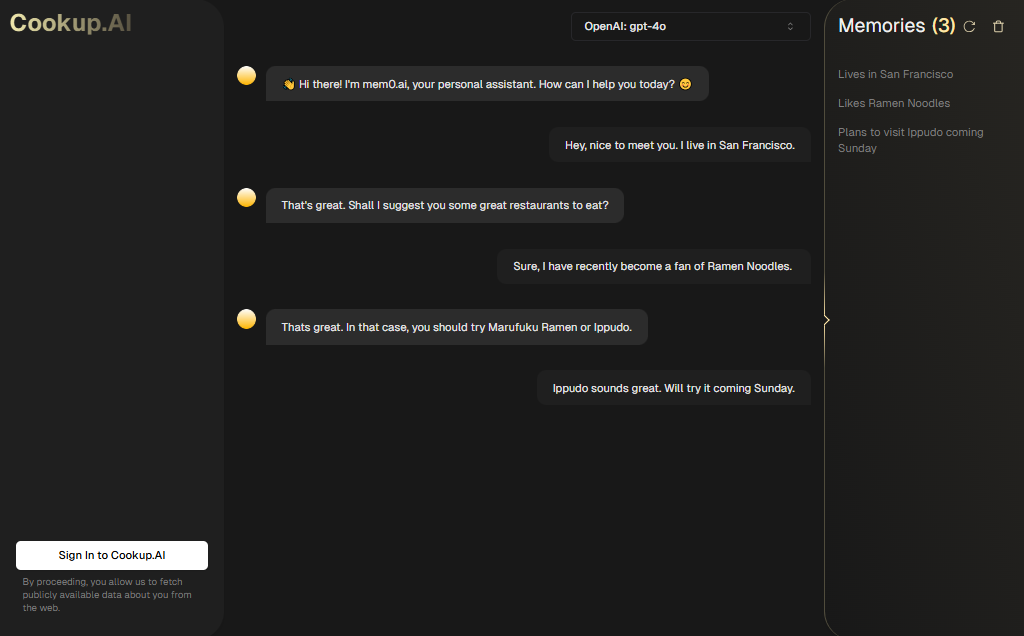
Cookup AI (found at cookup.ai) is an AI-powered personal assistant built on top of GPT-4o. The core idea is simple: you sign in, the assistant is allowed to pull in publicly available information about you and your interests from the web, and it uses that context — along with an ongoing “memory” of your conversations — to give more personalized answers over time.
In practice, this means Cookup AI can feel less like a generic chatbot and more like an assistant that remembers your preferences. For example, if you’ve mentioned that you enjoy Thai food or that you’re planning a trip, the tool can (in theory) recall that later and tailor its suggestions accordingly.
It’s worth being upfront about something here: because Cookup AI has repositioned itself multiple times, you may find older reviews describing it as a no-code AI app builder or a writing assistant. If you’re researching the tool today, treat the live product — a memory-enabled personal assistant — as the current source of truth, and don’t be surprised if older feature lists don’t match what you see after signing up.
How Does Cookup AI Work?
At a high level, Cookup AI works like most modern AI assistants, with two features layered on top: web-sourced personalization and persistent memory.
- You create an account and sign in. During this step, the platform asks for permission to fetch publicly available data about you from the web.
- You chat with the assistant using natural language. Instead of rigid menus, you type conversational requests — similar to how you’d talk to ChatGPT or a virtual assistant.
- The assistant checks its memory. If you’ve interacted with it before, it references anything it has stored about your preferences to shape its response.
- It generates a tailored reply. Because it runs on GPT-4o, responses are conversational, context-aware, and generally fast.
- New details get saved for next time. As you share more preferences or context, the assistant’s memory updates, so future conversations can be more relevant.
This workflow makes Cookup AI best suited to ongoing, personal use rather than one-off queries — the more you use it, the more context it builds up.
Key Features of Cookup AI
Based on the tool’s current positioning and publicly listed information, here are the features that stand out:
- Built-in memory — The assistant retains details from past conversations so it doesn’t start from zero every time you open it.
- Conversational interface — You interact through natural, chat-style prompts rather than complex settings or dashboards.
- Web data integration — With your consent, the tool pulls in publicly available information to add context to its responses.
- GPT-4o under the hood — Cookup AI is built on OpenAI’s GPT-4o model, giving it strong general reasoning and language ability.
- Personalized recommendations — Depending on the context you share, the assistant can suggest things like dining spots, activities, or ideas tailored to your stated interests.
- Simple sign-in flow — Getting started requires only an account sign-in rather than a lengthy setup process.
A fair caveat: because independent, up-to-date reviews of Cookup AI are scarce, some of these features are best verified firsthand rather than taken purely from marketing copy.
How to Use Cookup AI
If you want to try Cookup AI yourself, here’s a simple, beginner-friendly walkthrough:
- Go to the official website. Visit cookup.ai directly rather than through a third-party directory link, so you know you’re on the real site.
- Sign in to create your account. You’ll be asked to authorize the platform to fetch publicly available data about you — read this prompt carefully before accepting.
- Start a conversation. Type a question or request the same way you would with any AI chat assistant — for example, asking for a recommendation or help thinking through a task.
- Share context as you go. The more relevant details you provide (interests, location, preferences), the more useful the memory feature becomes over time.
- Check the “Memory” section. Cookup AI shows what it has stored about you, so you can review and understand what’s being remembered.
- Refine and continue. Keep chatting naturally — the assistant is designed to improve its responses as your conversation history grows.
Because the interface is conversational, there isn’t a steep learning curve. The main thing to get used to is that Cookup AI is meant to be used repeatedly, not just once.
Cookup AI Pricing and Plans
This is the area where transparency matters most, and honestly is where Cookup AI is weakest right now. Some directory listings mention a free tier, and older versions of the platform advertised a mix of free and paid app-building features. However, there is currently no detailed, clearly published pricing page with specific tiers, limits, or paid plan features that we could independently verify.
Here’s what we’d recommend if you’re considering it:
- Assume the core assistant is free to try based on the sign-in flow, but don’t assume all features will remain free.
- Look for an in-app or account billing page after signing in, since pricing details for AI tools change frequently and aren’t always reflected on marketing pages.
- Always check the official cookup.ai website directly before making any purchasing decision — pricing for AI tools can shift with little notice, and third-party directories are often out of date.
If pricing transparency is a priority for you, that’s worth factoring into your decision, since many competing assistants publish clear, itemized pricing pages.
Pros and Cons
| Pros | Cons |
|---|---|
| Simple, conversational interface that’s easy for beginners | Public information about the tool is inconsistent and limited |
| Built-in memory can personalize responses over time | No clearly published, detailed pricing page |
| Runs on GPT-4o, a capable underlying model | Independent, recent user reviews are hard to find |
| Low barrier to entry — just sign in and start chatting | The tool’s focus has shifted multiple times, which may signal instability |
| Web-data integration can add useful context | Requires trusting the platform with data fetched about you |
Who Should Use Cookup AI?
Cookup AI could be a reasonable fit for:
- Casual users who want a conversational assistant that remembers context between chats, without configuring anything complex.
- People curious about memory-enabled AI assistants who want to experiment with how persistent context changes the quality of AI responses.
- Early adopters who enjoy trying newer or smaller AI tools before they become mainstream.
It’s probably not the right choice for:
- Businesses or teams that need guaranteed uptime, clear pricing, and dedicated support — the limited public documentation makes this a harder sell for professional workflows.
- Privacy-conscious users who are uncomfortable with a tool fetching publicly available web data about them as part of onboarding.
- Anyone needing a mature, well-documented product with a long track record, given how often the tool’s focus has changed.
Best Alternatives to Cookup AI
If you want a personal AI assistant with a longer track record or clearer documentation, these are worth comparing:
- ChatGPT (with memory enabled) — OpenAI’s own assistant now includes a memory feature similar in concept to Cookup AI’s, with the advantage of a well-established product, clear pricing, and broad platform support.
- Google Gemini — Google’s assistant integrates with Gmail, Calendar, and Search, making it a strong option if you already live inside Google’s ecosystem and want contextual, personalized help.
- Microsoft Copilot — A solid pick for professionals already using Microsoft 365, with deep integration into Word, Excel, and Outlook.
- Claude — Known for thoughtful, detailed responses and strong reasoning, Claude is a good alternative for people who want a capable conversational assistant with transparent usage policies.
- Perplexity AI — If personalization matters less to you than accurate, well-cited answers pulled from the web, Perplexity is worth a look.
Each of these has clearer, publicly documented pricing and a longer history than Cookup AI, which may matter if you’re choosing a tool for long-term or professional use.
Is Cookup AI Safe to Use?
There’s no public evidence that Cookup AI is unsafe or malicious, but a balanced answer has to acknowledge the gaps in available information.
On the reassuring side, the tool is built on OpenAI’s GPT-4o, which is a well-vetted, widely used model, and the sign-in flow is transparent about requesting permission to fetch publicly available web data before doing so.
On the cautious side, there isn’t a large body of independent security reviews, established user reviews, or long-term track record to point to. Before signing in, it’s sensible to:
- Read the permission prompt carefully rather than clicking through it.
- Check the site’s privacy policy for details on how your data is stored and used.
- Avoid sharing sensitive personal, financial, or confidential business information in your conversations, as you would with any newer AI tool.
If you’re evaluating Cookup AI for personal, low-stakes use, the risk is likely comparable to trying any smaller AI startup. If you’re considering it for business use involving sensitive data, more due diligence is warranted first.
Frequently Asked Questions (FAQs)
1. What is Cookup AI used for? Cookup AI is currently positioned as a personal AI assistant with memory, designed to give personalized, conversational responses based on your stated preferences and publicly available web data.
2. Is Cookup AI free? The sign-in process suggests a free way to try the core assistant, but there’s no detailed public pricing page confirming what stays free long-term. Check the official site directly for current terms.
3. What AI model does Cookup AI use? Cookup AI runs on OpenAI’s GPT-4o model.
4. Does Cookup AI remember past conversations? Yes — memory is one of its main advertised features, and the interface includes a section where you can see what the assistant has stored about you.
5. Is Cookup AI the same tool people described as a no-code AI app builder? It shares the same name and website, but the product has evolved significantly. Older descriptions of app-building or restaurant-recommendation features may not reflect the current version of the tool.
6. Is Cookup AI safe for sensitive data? There’s no evidence of wrongdoing, but given the limited independent reviews and unclear data policies, it’s wise to avoid sharing sensitive personal or business information until you’ve reviewed the platform’s privacy terms.
7. What are good alternatives to Cookup AI? ChatGPT, Google Gemini, Microsoft Copilot, Claude, and Perplexity AI are all well-documented alternatives worth comparing.
Final Verdict
Cookup AI is an interesting example of a small AI tool that has quietly reinvented itself more than once — from a no-code app builder, to a restaurant recommender, to its current form as a memory-enabled personal assistant powered by GPT-4o. That flexibility might appeal to curious early adopters who enjoy testing newer tools.
That said, the lack of clear, published pricing and the thin amount of independent, recent user feedback are real drawbacks, especially if you’re evaluating it for anything beyond casual, personal experimentation. If you want a conversational AI assistant with memory and a longer track record, established options like ChatGPT or Gemini are safer bets for now.
If you’re still curious about Cookup AI, the best approach is to sign in, test it with low-stakes questions, and see whether its memory feature genuinely improves your experience — while checking the official site directly for the latest pricing and privacy details before relying on it for anything important.
Artifacts
Taskade ai guide
Document·MD
Taskade featured image
Image·SVG